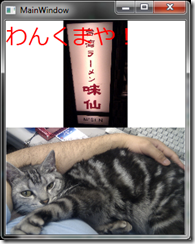
絵の上に文字を重ねるには同じRow、Columnに入れればいいだけです。
<Window x:Class="WpfApplication2.MainWindow"
xmlns="http://schemas.microsoft.com/winfx/2006/xaml/presentation"
xmlns:x="http://schemas.microsoft.com/winfx/2006/xaml"
Title="MainWindow" Height="350" Width="278">
<Grid>
<Grid.RowDefinitions>
<RowDefinition />
<RowDefinition />
</Grid.RowDefinitions>
<Image Source="IMAG0069.jpg" HorizontalAlignment="Stretch" VerticalAlignment="Center" />
<TextBlock FontSize="32" Text="わんくまや!" Foreground="Red" />
<Image Grid.Row="1" Source="IMAG0090.jpg" />
</Grid>
</Window>
あり合わせの画像だけど、こんな感じでかぶります。
http://blogs.wankuma.com/esten/archive/2010/06/27/190643.aspx